
General
Account/Password
Q: How do I change my password?
A: Login. Click the "Edit" link under the Personal Information section. Update the "Password" and "Confirm Password" fields. Click the "Save Changes" link. If you have not entered your billing information, you will be prompted to enter this information. This must be completed prior to viewing the My Account page where you will change your password.
Q: How do I reset my password?
A: Click on the "Login" link. Click on the "Forgot your password?" link. A new password will be emailed to you.
To ensure you are able to successfully log in with your temporary password:
- Add noreply@bwm.org to your contact list to ensure the email is delivered to your Inbox and not flagged as spam. Check your spam folder if you do not receive the email in your inbox.
- Input temporary password exactly as shown, with CAPS if applicable.
- Do not include quotes (" ").
Live Broadcast/Archived Teachings
Q: How Do I Watch The Service Online?
A: To watch our Live Broadcast, click on Broadcast & Media. Click on Live Broadcast.
Please Note:
- You do not have to login to view the Live Broadcast.
- Live Broadcast viewing is only available when services are in session. Our goal is to start the webcast prior to the start of service. If for some reason the Live Broadcast is started late, we ask that you try again in a few minutes.
Current service schedule:
* Sunday Morning - 11:15 a.m. (CST)
* Wednesday Evening - 6:30 p.m. (CST)
Q: I Am Unable To View The Pre-recorded Teaching Or Get It To Start From The Beginning
A: When a pre-recorded teaching is streamed, it is now only available for viewing at the time the live stream would have gone out. For example, the pre-recorded teaching is only available on Sundays at 11:15am (CST) and on Wednesday at 6:30pm (CST). Teachings are automatically started and cannot be restarted. Once the video has completed playing, it is no longer available for viewing. Pre-recorded teachings are not posted and not available for viewing on our Sunday/Wednesday Archives page.
On Demand teachings are available 24/7 at http://www.billwinston.org/bwof/
Q: Can I Watch/Purchase Sunday and Wednesday Teachings Online?
A: For those of you that can not join us online during our live webcast, you can preview and/or purchase our Sunday and Wednesday teachings in the archives. Here you will be able to preview Sunday and Wednesday services for a limited time. All teachings will then be available in our shopping cart in MP3/MP4 download format only. Click on Broadcast & Media. Click on Sunday Wednesday Archives.
Q: Why Am I Only Able To Watch A Limited Number Of BWOF Archived Teachings?
A: All visitors of the website have access to view our Believers Walk of Faith Archives. Here you will be able to view a limited selection of archived teachings. Partners of Bill Winston Ministries have access to a more expanded teaching selection. For access to more archived teaching, partner with us. You can also watch and download select free teachings in our Seeds & Needs section. Check out our Podcast section for additional free teaching.
Q: What are the system requirements to view the live broadcast?
A:
- A good internet connection with cable modem, DSL or better.
- Windows 10/7, or Mac OS® X 10.5 Leopard® or later
- Minimum of a Dual core processor or faster with at least 4 GB of RAM. We recommend at least i5 processor with 8 GB of RAM
- Latest version of Adobe Flash Player. Click here to download and install the Flash Player.
- Latest version of browser: Firefox, Google Chrome or Safari
- External speakers are recommended.
- Minimum of 700 Kbps bandwidth. We recommended 800 or better.
Your streaming quality will be determined by your connection speed!
- A Normal stream is a 300k stream.
- A Medium stream is a 500k stream.
- A High stream is a 800k stream.
- JavaScript and Java enabled.
It is possible that JavaScript is disabled in your web browser. Here's a quick test to find out. Click this link.
If you saw a popup box when you clicked the link, JavaScript is enabled. If you did not see a popup, you need to enable JavaScript in your browser.
- Enabling JavaScript using Microsoft Internet Explorer
From the menu bar at the top of the page, click Tools -> Internet Options.
Click the Security tab.
Click the Internet zone.
Under normal circumstances, click the Default level.
If you are need custom security settings, click Custom Level. Then, click "Enable" in the Active Scripting option.
- Enabling JavaScript using Mozilla Firefox
From the menu bar at the top of the page, click Tools -> Options. (On a Mac, at the top of the screen click Firefox -> Preferences.)
Click the Content tab
Check the box labeled "Enable JavaScript".
Click OK. (On a Mac, just close the Preferences screen.)
- Enabling JavaScript using Safari
In the Safari menu at the top of the screen, click Preferences.
Click the Advanced tab.
Check the box next to "Enable JavaScript".
Close the Preferences window.
Q: Why am I not able to view archive teachings on my iPad?
A: Our video teachings run on Adobe Flash. You can run Adobe Flash on the Mac, however, you can't run it on Apple's iOS devices (iPhone, iPod Touch, iPad). To view archive teachings on these devices, download our free BWM App from the iTunes store.
Orders/Shopping Cart/Shipping
Q: What Is The Difference Between A MP3 And A MP4?
A: MP3 is the audio version of our teachings (like a CD) and MP4 is the video version of our teachings (like a DVD). Both formats are downloaded to your PC/Computer and can be played directly from your PC/Computer or copied to a MP3 Player/Ipod or CD/DVD.
Q: How Do I Purchase/Download A MP3 Or MP4?
A: MP3/MP4 formats are now available for purchase on our website. These teachings are a fraction of the cost of our CD/DVD formats, there are no shipping fees associated with them (you just download them to your PC), and anyone anywhere can purchase them with ease.
To purchase MP3/MP4 formats: Click on Store. Find the teaching you would like to purchase. The summary will indicate if MP3/MP4 format is available for purchase. Click on the title of this teaching. Select MP3/MP4 format. Click Add to Cart.
To download MP3/MP4 purchases: Login. From the My Account page click on Order History. Select the order number the MP3/MP4 was purchased. Scroll to the bottom of the page. Click on the MP3/MP4 link to download to your PC. Download file to your C: drive on your computer. After you have downloaded the file you can play the file directly from your computer or transfer the file to your iPod.
Q: When will the items I purchased be delivered?
A: In most cases, products shipped in the US should arrive in 7-10 business days. Products shipped outside the US should arrive in 10-14 business days. MP3/MP4 files download immediately upon purchase. The items will not be shipped.
Donations/Partnership
Q: How Do I Become A Partner With Bill Winston Ministries?
A: You can become a partner 1 of 2 ways:
- Online
- New users, create an account. After you have created an account, login.
- Existing users, login.
- Click on Support BWM. Online donations by credit card only.
- Select the option to become a Faith Partner with Bill Winston Ministries.
- Complete and submit the donation form.
- Customer Service will receive your request to become a partner and mail a partner kit to you. You will also be added to Partner Café. You can access Partner Café once you receive your welcome email.
- Contact Customer Service at 708-697-5100
- Customer Service will mail a partner kit to you.
- New users will be required to create an account in order to access Partner Café. Once you create an account, click on Contact Us and request to be added to Partner Café. You can access Partner Café once you receive your welcome email.
- Existing users must communicate to the Customer Service representative that they have an existing account and request to be added to Partner Café. You can access Partner Café once you receive your welcome email.
Q: How Do I Access Partner Letters?
A: Partner Letters are exclusively for our Bill Winston Ministries partners. Partners can access monthly letters written by Dr. Winston by logging in at www.billwinston.org. Click on Partners; Click on Partner Café; Click on Partner Letter.
Q: How Do I Get My End Of The Year Statement For Tax Purposes?
A: Each time you donate, you will receive an email confirmation which will serve as your receipt. Please retain a copy of this receipt for tax purposes. End of year contribution statements are only available upon request by calling the BWM office directly at (708) 697-5100.
Q: Can I Receive The Partner Letter Electronically?
A: We are in the process of giving partners the option to receive their partner letters electronically. This is a work in progress and we will notify partners once this option has been implemented. Partners now have the ability to view/download monthly partner letters on the website. Login at www.billwinston.org. Click on Partners. Click on Partner Cafe. Click on Partner Letter. If you wish to no longer receive your partner letter in the mail, please contact Customer Service at (708) 697-5100 and request to be removed from our partner letter mailing list.
Q: How do I make a donation by check?
A:Donations can be mailed to:
Bill Winston Ministries
P.O. Box 947
Oak Park, IL 60303
Please make your check payable to Bill Winston Ministries. Your gift is tax deductible as allowed by law. Contact a Bill Winston Ministry Representative at (800) 711-9327 if you need further assistance.
Q: Why can't I donate less than $25?
A: You can donate less than $25 to Bill Winston Ministries. On the Support BWM page, select one of the following options. Each option will allow you to select a contribution amount or enter a desired amount to donate.
- I am currently a Faith Partner with Bill Winston Ministries. Here is my financial contribution. (This option is for current Faith Partners)
- Here is my one-time gift.
- Yes, I'd like to become a Faith Partner with Bill Winston Ministries. I will submit my financial commitment online or by mailing a check.
The option “Yes, I'd like to become a Faith Partner with Bill Winston Ministries. You can count on the following financial monthly commitment.” only allows you to select a contribution amount listed.
Errors Processing My Credit/Debit Card
Q: Why Am I Getting AVS Rejected Error When Processing My Credit/Debit Card?
A: The address you provided does not match the address on file with your Credit Card Company/Bank. Please ensure the following:
1.) Do not use special characters (for example, use Apt 2 instead of the pound sign (#2).
2.) Make sure that you are entering the billing address on file with your Credit Card Company/Bank. We suggest getting a credit card/bank statement and ensure you are inputting your address exactly as indicated on the statement. Next check with your Credit Card Company/Bank and verify that a) the address associated with your credit/debit card and b) the address for your account profile are both correct. Please note: we only forward the information you inputted over to the Credit Card Company/Bank AVS (Address Verification System). They return to us whether the credit/debit card is valid based on the information they have on file.
3.) Bill Winston Ministries conducts address verification when processing credit/debit card transactions. Other websites may not be conducting address verification thus cannot be compared to our process.
Q: Why Am I Getting CVV Rejected Error When Processing My Credit/Debit Card?
A: The credit card verification number you provided is incorrect. Please ensure that you are entering the correct credit card verification number. On most credit/debit cards, this 3 digit number can be found on the reverse side of the card. On American Express card, this 4 digit number can be found on the front side.
News and Events
Q: Why Can’t I See All Of Dr. Winston’s Itinerary?
A: The current month events are displayed on the website. To access additional months, click arrow buttons on the calendar. Clicking on the View All Events button will display all events for the selected month.
Social Media
Technical
Q: Why Does Unrelated Track Information Appear When I Play Your CDs In Windows Media Player?
A: When playing or copying an audio CD, Windows Media Player attempts to locate information associated with that CD, such as the artist name, title, and track names. This information is added to the overall list of information that is kept in the Media Library. To obtain this information, Windows Media Player sends a unique CD identification number to WindowsMedia.com. No personally identifiable information is obtained or stored during this transaction.
To prevent the Player from searching for audio CD and music file information:
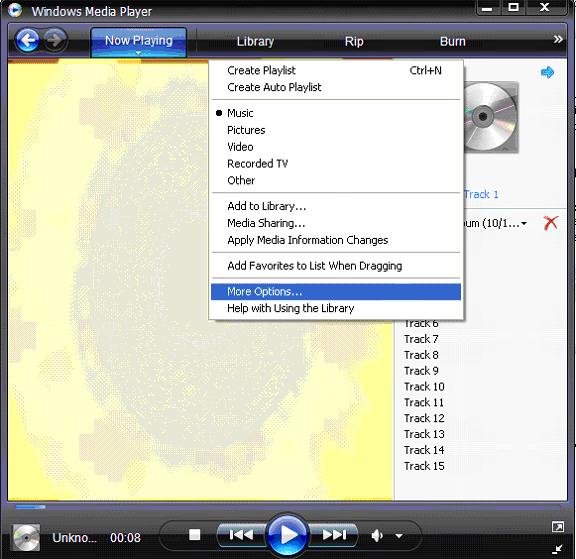
Open Windows Media Player
Pull down menu under Library
Select More Options
Select Privacy tab
Make sure that the following unchecked options are unchecked on your screen:
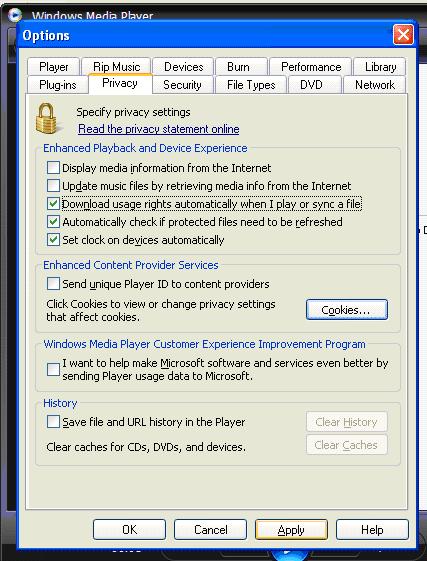
Click Clear History button.
Click Clear Caches button.
Click Apply button.
Click OK button.
Close then re-launch Windows Media Player.